Measure Your Network's True Performance
Professional iperf3 testing on Android, iOS, and Mac. TCP and UDP speed tests, real-time charts, and full parameter control powered by native iperf3.
iOS & Mac Version iperf3.chama.pro chama.pro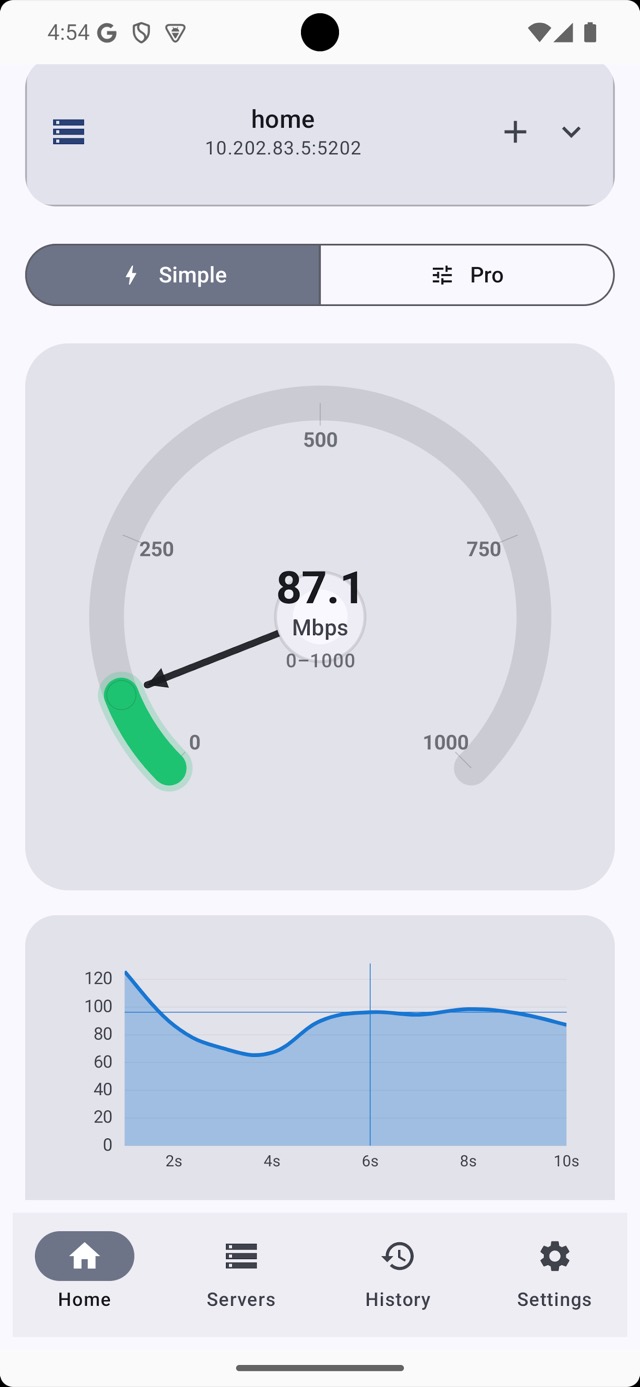
Everything You Need for Network Testing
A complete iperf3 toolkit for Wi-Fi, Ethernet, VPN, and lab network diagnostics.
TCP and UDP Speed Testing
Run repeatable bandwidth tests with both protocols, including upload and download measurements and configurable parallel streams.
Built-in Server Mode
Turn your Android device into an iperf3 server and test between phones or against any desktop iperf3 client.
Real-Time Charts
Watch bandwidth, jitter, and packet loss update live during each iperf3 session.
Advanced Mode
Control buffer sizes, TCP window sizes, congestion algorithms, TOS or DSCP, IP version, parallel streams, and custom flags.
History and Export
Save every result automatically and export as CSV or JSON for reporting, monitoring, and comparisons over time.
14 App Languages
The app interface is localized for global teams, including Russian, Spanish, Chinese, German, French, Dutch, Japanese, Korean, Portuguese, and Thai.
Themes and Color Schemes
Choose between dark and light themes, ten accent gradients, and multiple speedometer styles.
Cross-Platform
Available on Android, iPhone, iPad, Mac, and Apple Vision Pro with layouts optimized for foldables, tablets, and desktops.
Native iperf3 v3.16
Built on the official iperf3 library compiled natively via JNI for desktop-class accuracy without wrappers.
See It in Action
A clean interface for quick tests and deep tuning. Tap any screenshot to open the gallery.
Get Started in Minutes
Three quick steps to measure throughput, jitter, and packet loss with iperf3.
Install the App
Download iPerf3 Client & Server from Google Play or the App Store. The setup takes seconds.
Configure Your Test
Enter a server address, choose TCP or UDP, and tune the parameters you need, or keep the quick defaults.
Analyze Results
Review real-time charts, detailed metrics, and exported history to compare performance over time.
Built for Accuracy
The technical foundation behind reliable iperf3 measurements on Android, iPhone, iPad, Mac, and Vision Pro.
Specifications
$ iperf3 -c 192.168.1.1 -t 10 -P 4
Connecting to host 192.168.1.1, port 5201
[ ID] Interval Transfer Bitrate
[ 5] 0.00-1.00 sec 112 MBytes 939 Mbits/sec
[ 5] 1.00-2.00 sec 114 MBytes 958 Mbits/sec
[ 5] 2.00-3.00 sec 113 MBytes 951 Mbits/sec
[ 5] 3.00-4.00 sec 114 MBytes 956 Mbits/sec
[ 5] 4.00-5.00 sec 112 MBytes 940 Mbits/sec
- - - - - - - - - - - - - - - - - - -
[ ID] Interval Transfer Bitrate
[ 5] 0.00-10.00 sec 1.12 GBytes 958 Mbits/sec sender
[ 5] 0.00-10.00 sec 1.12 GBytes 957 Mbits/sec receiver
iperf Done.
Frequently Asked Questions
What is iperf3 and how is it different from a regular speed test?
iperf3 is a professional network performance tool. Instead of measuring your internet speed to a public server, it measures throughput between two endpoints you control. That makes it useful for Wi-Fi diagnostics, LAN validation, VPN testing, and infrastructure benchmarking.
Do I need my own iperf3 server?
You can run your own iperf3 server on a computer, use a public server from the in-app directory, or enable the built-in server mode on a second Android device.
Is the app free?
No. The app is sold as a one-time purchase. Pricing varies by country, may change over time, and there are no subscriptions or in-app purchases.
What platforms are supported?
The app is available on Android 7.0+, iPhone and iPad with iOS 16.6+, Mac with macOS 13.5+, and Apple Vision Pro with visionOS 1.0+.
How accurate are the results?
The app uses the official iperf3 v3.16 library compiled natively via JNI, so the measurements match desktop iperf3 behavior as closely as possible.
Can I export test results?
Yes. Every result is stored in history and can be exported as CSV or JSON for analysis, reporting, and monitoring workflows.
Does it support UDP testing?
Yes. You can run both TCP and UDP tests. UDP mode is useful when you need jitter and packet loss metrics for VoIP, streaming, and gaming scenarios.
What is Advanced Mode?
Advanced Mode exposes iperf3 parameters such as buffer size, window size, congestion control, TOS or DSCP, IP version, parallel streams, and custom flags for precise network engineering workflows.